

DIY Bookkeeping with GnuCash a FREE, powerful, and robust accounting solution, based on double-entry professional accounting principles, which ensures balanced books and accurate records. It gives you the tools you need to manage your finances with confidence — without the subscription fees…
GnuCash is ideal for users seeking a free and powerful desktop-based, customizable, and secure alternative to paid software. The program offers free updates to the program regularly, which means you can use it year after year for your accounting needs with no need to purchase anything. It’s compatible with multiple operating systems, including Windows, macOS, and Linux.
If you’re tired of running around the Internet searching for GnuCash tutorials including on youtube or searching forums trying to find answers, if you tired of sifting through receipts and struggling with confusing spreadsheets, or paying for expensive accounting software, our courses and resources were made just for you!
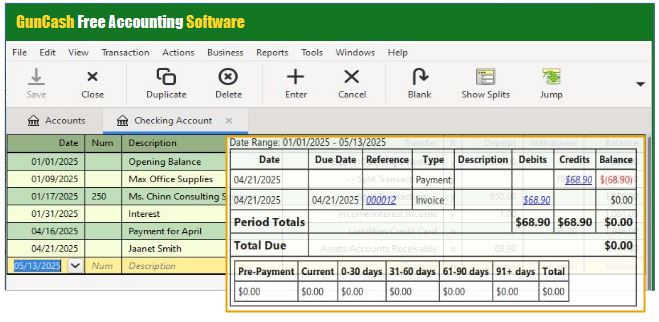 Entering data into Gnucash is as easy as entering transactions into a checkbook register…Generating reports is just as easy…Based on professional accounting principles, GnuCash is designed to be easy to use and intuitive, similar to a checkbook register. GnuCash supports multiple account setups and the program offers free updates to the program regularly, which means you can use it year after year for your accounting needs with no need to purchase anything more.
GnuCash gives small businesses big‑business financial power — without the cost, complexity, or loss of control.” The robust features included:
1. Double‑Entry Accounting
“GnuCash uses the same accounting engine trusted by professional bookkeepers, ensuring your numbers stay accurate and balanced — even if you’re brand new to bookkeeping.”
Benefit: Accurate books, fewer mistakes, clean reports
2. Full Chart of Accounts Customization
Whether you have a small business, sell on online, , run a nonprofit, or manage multiple income streams, GnuCash adapts to your business”
Benefit: A bookkeeping system that fits your business
3. Robust Register System
GnuCash offers checkbook‑style registers for every account ! Track your money with a clean, familiar interface that feels like balancing a checkbook — but with the power of a full accounting system behind it.”
Benefit: Simple, intuitive daily bookkeeping
4. Accounts Receivable & Accounts Payable
“GnuCash helps you manage who owes you and who you owe — all in one place. Track invoices, bills, and payments with clarity so your cash flow stays healthy and your business runs smoothly.”
Benefit: Stay organized, get paid on time, and keep expenses under control Feature: Full A/R and A/P tracking with invoices, bills, due dates, and payment history
5. Payroll Tracking
Whether you pay yourself or a small team, GnuCash keeps payroll organized and transparent. Record wages, taxes, and with-holdings cleanly so your books stay accurate and audit‑ready.”
Benefit: Confidently track wages, taxes, and payroll expenses Feature: Payroll account structures, tax categories, and paycheck breakdowns
6. Bank Reconciliation That Actually Makes Sense A Side‑by‑side reconciliation tool to reconcile your accounts with clarity and confidence — no guessing, no confusion, no mismatched numbers.”
Benefit: Confidence that your books match your bank
7. Robust Importing System
Import your sales and expenses into GnuCash with just a few clicks. Import bank statements , CSV, QIF, OFX and more. Spend less time typing and more time creating.
Benefit: Faster bookkeeping, fewer manual entries
8. Powerful Reporting Tools
“Turn your numbers into insight. GnuCash gives you the reports you need to make smart decisions — without paying for expensive software.” Feature: Profit & loss, cash flow, net worth, category summaries, vendor/customer reports
Benefit: See your business clearly
9. Scheduled Transactions & Automation
“Automate your monthly bookkeeping. GnuCash remembers your recurring bills, transfers, and income so you don’t have to.”Gnucash offers recurring transactions with reminders
Benefit: Save time and stay consistent
10. Multi‑Currency Support
“Sell worldwide with confidence. GnuCash handles multiple currencies and keeps your books accurate across borders.Feature: Currency conversion and tracking
Benefit: Perfect for global sellers
11. 100% Free, Open‑Source, and Private
“Your financial data stays yours with locally stored data, open‑source transparency . No monthly fees. No forced upgrades. No one selling your information.”
Benefit: No subscriptions, no data mining, no lock‑in
12. Scales From Simple to Advanced
“Whether you’re tracking simple income and expenses or managing multiple accounts, GnuCash grows with you — without ever overwhelming you.”Cash‑basis simplicity + advanced features when needed
Benefit: Start small, grow big
13. Perfect for Nonprofits
“Track donations, programs, and fund balances with clarity and integrity — all without paying for expensive nonprofit software.”
Benefit: Clear donor tracking and fund clarity, account hierarchies, restricted funds, reporting
Q: Can GnuCash Replace QuickBooks?
Absolutely! GnuCash was originally designed as a personal finance application but has since added a number of business-related features.
Q: Is GnuCash Really Free?
Yes, GnuCash is completely free to anyone and everyone! It is open-source accounting software with no cost for the software itself. It is licensed under the GNU General Public License (GPL) and is available for desktop use on Windows, macOS, and Linux. It is designed for personal and small-business financial management.
Q: Is GnuCash Good For Small Business?
Yes! It can be a valuable tool for various types of businesses. GnuCash is a powerful and flexible accounting tool that can be used for small business accounting. It has a number of features that makes it particularly well-suited for this purpose, including the ability to track expenses and income, generate reports, and manage invoices It’s designed to be easy to use, yet powerful and flexible and it’s based on professional accounting principles to ensure balanced books and accurate reports.
Q: Does GnuCash work for Mac/Linux/Windows?
Yes! It’s compatible with multiple operating systems, including Windows, macOS, and Linux. The principles taught in this course apply across all operating systems where GnuCash is supported.
If you have a desktop computer that can run the software, you can use it for free for as long as it’s downloaded.
Q: I’ve seen your YouTube videos; why buy the course?
While my YouTube videos cover individual tasks, this course provides the connected workflow. It includes exclusive modules on payroll, sales tax, and tax mapping that aren’t available elsewhere, plus a logical sequence that prevents common setup errors.
Q: Can I really do payroll in GnuCash?
Absolutely. While GnuCash doesn’t “calculate” the taxes for you, we teach you exactly how to record those transactions so your liabilities are always accurate.